Guide
Shopify
Installation Guide
Here is an example of what your Zippy Touch code snippet will look like:
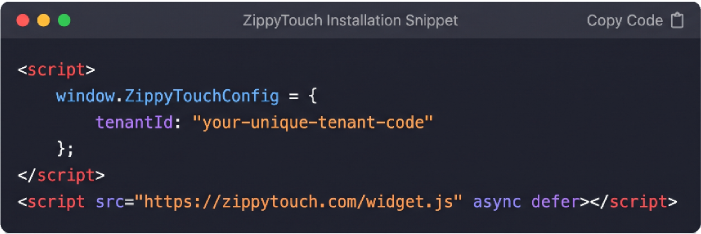
Adding the Zippy Touch widget to your Shopify store is done by embedding the snippet into your theme layout. This ensures your widget displays seamlessly across product pages, custom pages, and collections without affecting your store performance.
Method 1: Editing theme.liquid (Recommended & Site-Wide)
This approach inserts Zippy Touch into your central theme layout so the widget automatically loads on every page of your storefront.
Step 1: Access your theme code
- Log in to your Shopify Admin dashboard.
- Navigate to Online Store > Themes on the left sidebar.
- Click the ... (three dots) button next to your active theme and select Edit code.
Step 2: Locate your layout file
- In the left file navigator under the Layout directory, click
theme.liquid. - Scroll down to the bottom of the editor window to find the closing
</body>tag.
Step 3: Paste your Zippy Touch snippet
- Copy your unique snippet from your Zippy Touch dashboard.
- Paste the code on a new line directly above the closing
</body>tag.
Step 4: Save your theme
- Click the blue Save button in the top-right corner to publish the widget to your live store.
Method 2: Using Custom Liquid in Theme Editor (Alternative)
Use this approach if you are using an Online Store 2.0 theme and prefer using Shopify's visual customizer without touching raw code files.
Step 1: Open the Theme Editor
- From Online Store > Themes, click Customize next to your active theme.
- Navigate to the page where you want the Zippy Touch widget to appear.
Step 2: Add a Custom Liquid section
- In the left sidebar panel, click Add section (or Add block inside an existing section).
- Select Custom Liquid from the list of options.
Step 3: Paste code and save
- Paste your Zippy Touch snippet directly into the Custom Liquid text field.
- Click Save in the upper-right corner to push your changes live.

