Guide
Squarespace
Installation Guide
Here is an example of what your Zippy Touch code snippet will look like:
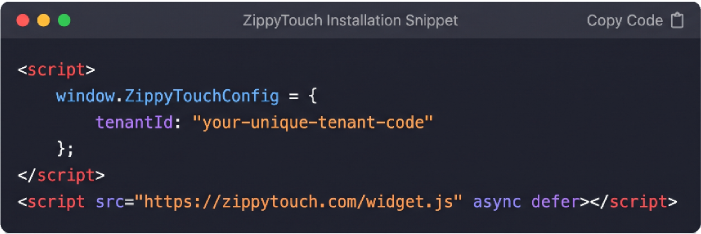
Adding the Zippy Touch widget to your Squarespace website requires inserting your snippet into Squarespace's Code Injection settings. This automatically loads the widget across all pages without altering your site template.
Method 1: Site-Wide Code Injection (Recommended)
This method automatically deploys Zippy Touch across every page of your site and ensures the widget remains active when changing templates or layouts.
Step 1: Navigate to Code Injection
- Log in to your Squarespace Home menu and select your site.
- Go to Website > Website Tools > Code Injection (on older layouts, navigate to Settings > Developer Tools > Code Injection).
Step 2: Paste your Zippy Touch snippet
- Scroll down to the Footer text box.
- Paste your complete Zippy Touch widget snippet into the field.
- Placing the code in the Footer ensures your site content loads first without any delay.
Step 3: Save your changes
- Click Save in the top-left corner of the panel to publish your changes.
- Refresh your live website to confirm the Zippy Touch widget appears.
Method 2: Single-Page Code Block (Alternative)
Use this approach if you only want the Zippy Touch widget to load on a specific page rather than site-wide.
Step 1: Edit the target page
- Navigate to the specific page in your Squarespace panel and click Edit in the top-left corner.
- Click Add Block or hover over an insertion point in the section where you want to place the widget.
Step 2: Add a Code Block
- Select Code from the block menu.
- Ensure the code format is set to HTML.
- Paste your Zippy Touch snippet directly inside the code editor box.
- Toggle off Display Source Code if it is enabled.
Step 3: Save your page
- Click Save at the top left of the page editor to apply the changes.

