Guide
Wix
Installation Guide
Here is an example of what your Zippy Touch code snippet will look like:
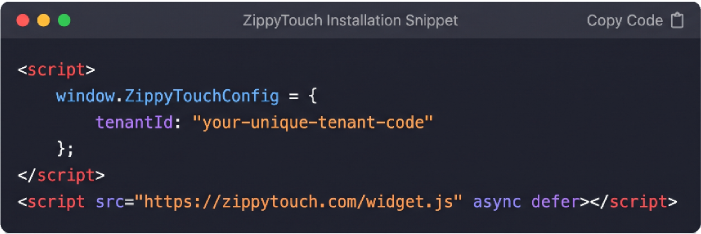
Adding the Zippy Touch widget to your Wix website is done using Wix's Custom Code settings in your dashboard. This automatically deploys the snippet across your site without interfering with your visual layout or template design.
Method 1: Site-Wide via Custom Code (Recommended)
This method embeds Zippy Touch globally across your entire website and keeps the widget active even when changing site templates or themes.
Step 1: Open Custom Code settings
- Log in to your Wix Dashboard and select your website.
- Navigate to Settings on the left sidebar menu.
- Scroll down to the Advanced section and click Custom Code.
Step 2: Add your Zippy Touch snippet
- Click + Add Custom Code in the top-right corner.
- Paste your complete Zippy Touch widget snippet into the code text box.
- Type Zippy Touch Widget in the Name field so you can easily identify it later.
Step 3: Configure placement & publish
- Under Add Code to Pages, select All Pages (choose Load code once).
- Under Place Code in, select Body - end to optimize page loading performance.
- Click Apply to publish the widget to your live website.
Method 2: Single-Page HTML Embed (Alternative)
Use this approach if you prefer to embed the Zippy Touch widget on a specific page using the Wix visual editor.
Step 1: Open the Wix Editor
- From your Wix Dashboard, click Edit Site to open the visual page builder.
- Navigate to the target page using the pages dropdown menu.
Step 2: Add an HTML Embed block
- Click the + (Add Elements) button on the left toolbar.
- Select Embed Code > Popular Embeds and click Embed HTML.
- Click the Enter Code button above the new element box.
Step 3: Paste code and update
- Ensure the input toggle is set to Code.
- Paste your Zippy Touch snippet directly into the text box and click Update.
- Click Publish at the top right of the editor to make your changes live.

