Guide
Wordpress
Installation Guide
Here is an example of what your Zippy Touch code snippet will look like:
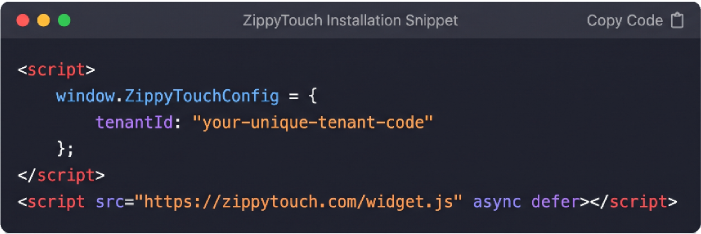
The safest and most reliable way to insert the Zippy Touch widget snippet into WordPress is by using a dedicated header/footer plugin. This method prevents your widget from disappearing when your WordPress theme updates.
Method 1: Using a Plugin (Recommended & Safest)
This approach isolates your code so you do not risk breaking your site's core theme files.
Step 1: Install a code snippet plugin
- Log in to your WordPress dashboard, navigate to Plugins > Add New.
- Search for a reputable, lightweight snippet manager like WPCode (formerly Insert Headers and Footers) or Header Footer Code Manager (HFCM).
- Click Install Now and then Activate.
Step 2: Open the header/footer section depending on your choice
- For WPCode: Go to Code Snippets > Header & Footer on your left menu sidebar.
- For HFCM: Click on HFCM > Add New Snippet.
Step 3: Paste your Zippy Touch code
To ensure your website loads fast, the Zippy Touch snippet should be placed at the bottom of the document. Paste your code directly into the Footer (or "Body") box.
Step 4: Save your changes
Click Save Changes or Update at the top right.
Method 2: Editing theme files directly (Advanced)
Warning: If you update your WordPress theme in the future, it will overwrite this file and delete your Zippy Touch widget. Only use this if you are using a child theme or never plan to update your current theme.

